Add live chat, inline AI answers, or your own custom UI. All from a single script tag.
Installation
Paste this before the closing </body> tag on your site:
<script src="https://www.cstar.help/cstar.js?team=YOUR_TEAM_SLUG"></script>
Replace YOUR_TEAM_SLUG with your team's slug or ID, found in Settings → Team → Install.
That one script handles everything. cStar auto-detects what's on your page and loads only what's needed:
- See
[data-cstar-launcher]or[data-cstar-panel]→ loads Custom Mode - See no custom attributes → loads the Prebuilt Floating Widget
- See
[data-cstar-quickhelp]anywhere → also loads Quick Help (in parallel)
You can mix Quick Help with either chat mode on the same page.
Configuration
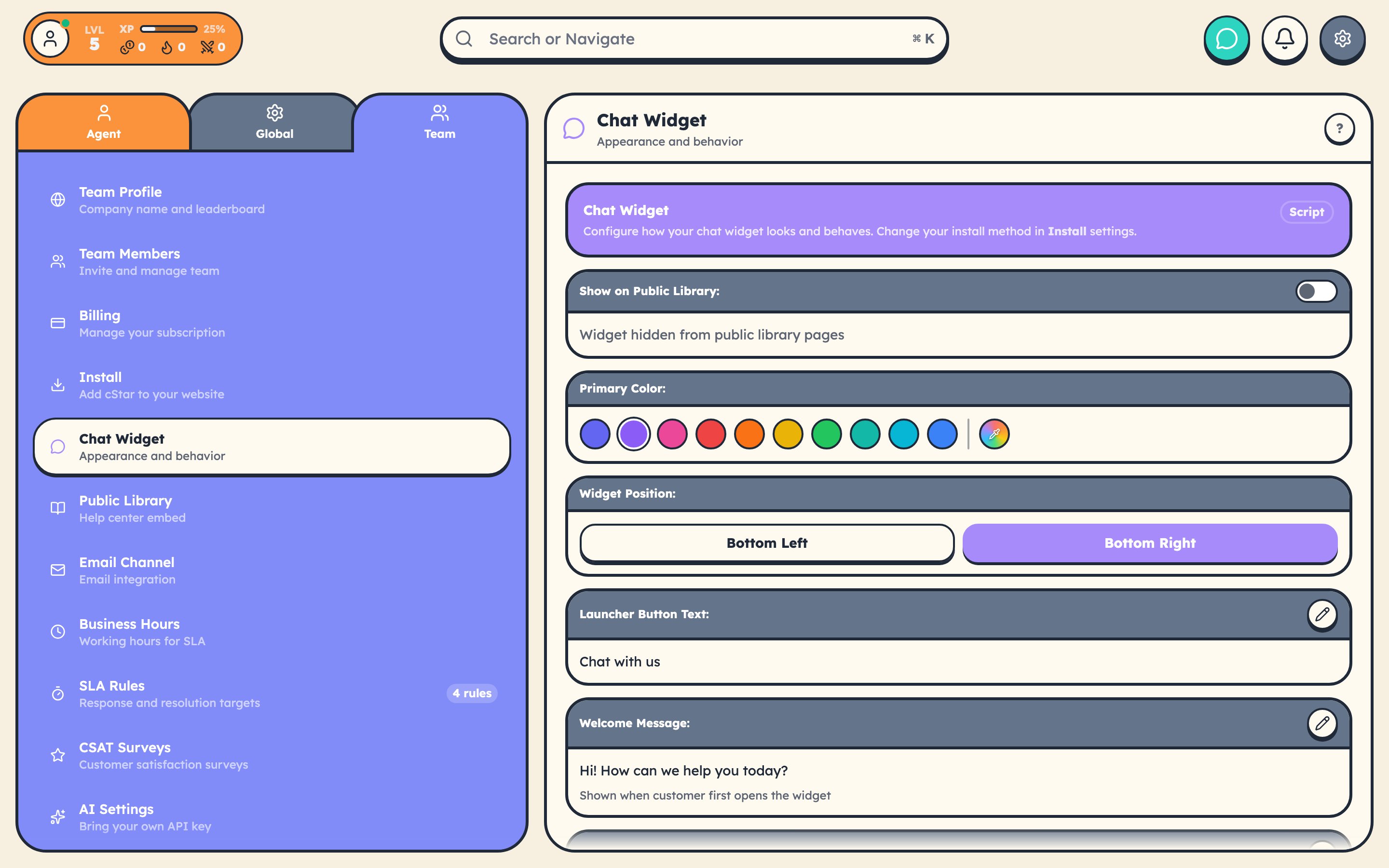
Customize the prebuilt widget in Settings → Team → Chat Widget:
- Primary color: match your brand
- Position: bottom-right or bottom-left
- Launcher text: the button label (default: "Chat with us")
- Welcome message: first thing customers see when they open the chat
- Offline message: shown when your team isn't available
- Terms / Privacy URLs: link your legal pages
Looking for a complete attribute list? See All data-cstar-* Attributes (Reference). Every attribute on one page, grouped by mode and purpose.
Three Ways to Use cStar on Your Site
| Mode | What You Get | Best For |
|---|---|---|
| Prebuilt Floating Widget | A polished chat launcher in the corner. Zero markup needed. | Most teams. Drop the script, you're done. |
| Custom Mode (guide) | You write the HTML/CSS, cStar wires up the data layer via data-cstar-* attributes. |
Pixel-perfect control over chat UI. |
| Quick Help (guide) | An inline AI Q&A box, no panel. One question, one answer, sourced from your knowledge base. | Docs pages, FAQ pages, marketing pages. |
For full programmatic control without the embed script, use the npm packages: @cstar.help/js, @cstar.help/react, @cstar.help/svelte. Set Settings → Team → Install to SDK Only mode.
What's Built In (Prebuilt Mode)
- Real-time messaging with typing indicators
- File attachments (images, documents, video)
- Conversations automatically become tickets in your queue
- Offline mode collects messages when nobody's available
- Customer authentication, optional (Customer Identity Verification)
- Custom buttons that open the widget anywhere on your page (guide)
Install Modes (Settings → Team → Install)
| Mode | Behavior |
|---|---|
| Script | The default. One script tag handles everything. |
| SDK Only | No embed script. You control the lifecycle via npm packages. |
| Off | cStar inactive on your site. |
Testing
Visit your website after adding the script. You should see the chat launcher in the corner. Click it to open a test conversation. If it doesn't appear, check the browser console for errors and confirm your team slug is correct.