The cStar API is a REST API that lets you manage tickets, customers, and articles programmatically. This page gets you from zero to your first successful API call.
Grab Your API Key
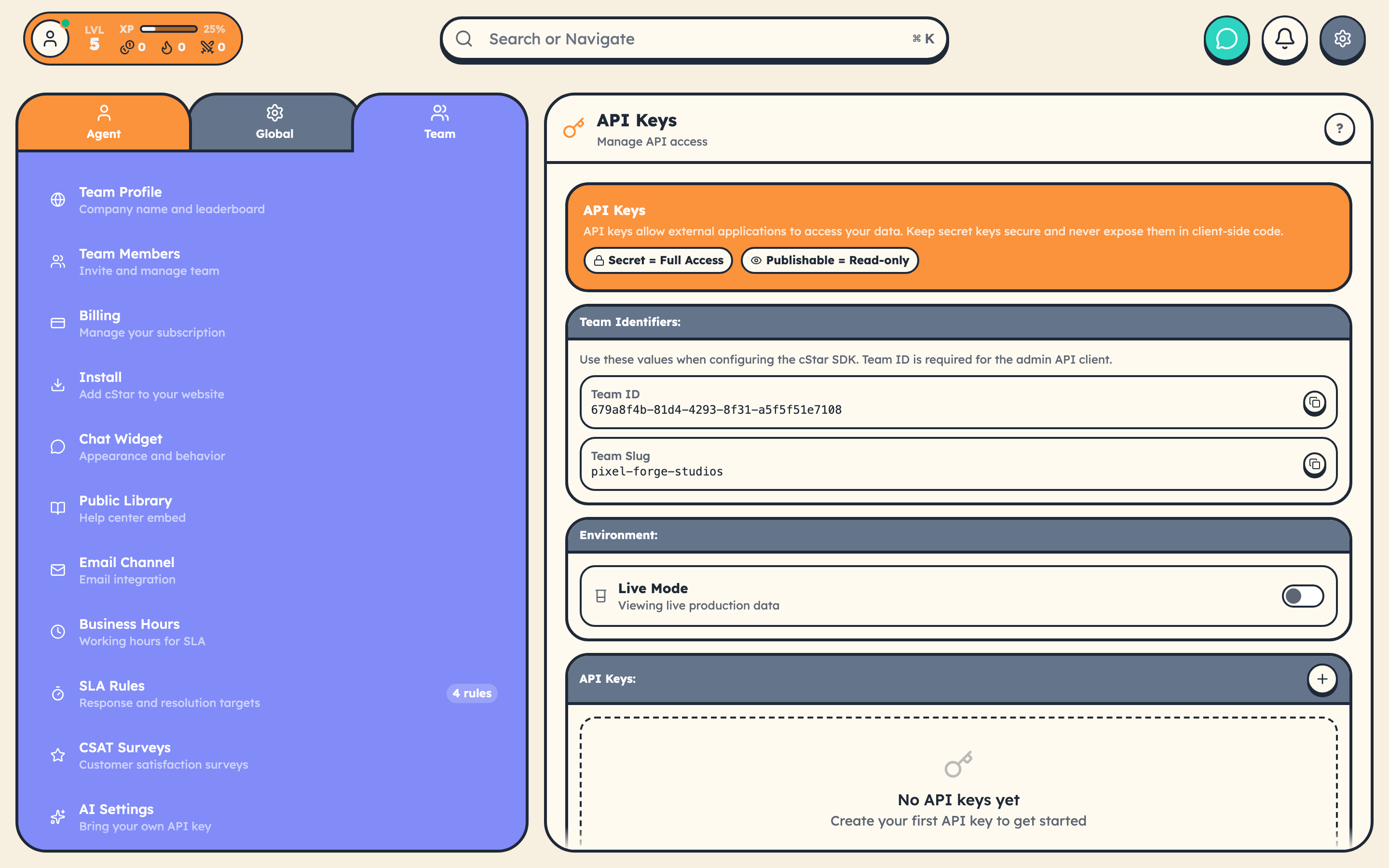
- Open Settings → Team → API Keys in your cStar dashboard.
- Copy your Secret Key (starts with
sk_live_orsk_test_). - Store it securely. Treat it like a database password.
You also get a Publishable Key (starts with pk_live_ or pk_test_). Publishable keys are read-only and safe for browser code.
Make Your First Request
curl https://www.cstar.help/api/v1/teams/YOUR_TEAM_ID/tickets \
  -H "Authorization: Bearer sk_live_your_secret_key"
You should get back a JSON response with your tickets. If you get a 401, double-check the key.
Authentication
Every request needs a Bearer token in the Authorization header:
Authorization: Bearer sk_live_your_secret_key
| Key Type | Prefix | Access | Where to Use |
|---|---|---|---|
| Secret | sk_live_ / sk_test_ |
Full CRUD (read, write, delete) | Server-side only |
| Publishable | pk_live_ / pk_test_ |
Read-only | Client-side OK |
Public Library API (No Key Required)
The Library API is open. No API key needed. Use it for custom help centers, knowledge base widgets, or SEO-friendly article pages.
// Search articles
const res = await fetch('https://www.cstar.help/api/library/YOUR_TEAM/search?q=billing&limit=5');
const { data } = await res.json();

// Get all categories
const cats = await fetch('https://www.cstar.help/api/library/YOUR_TEAM/categories');

// Get a single article by slug
const article = await fetch('https://www.cstar.help/api/library/YOUR_TEAM/articles/how-to-reset-password');

// Record a view (useful for analytics)
await fetch('https://www.cstar.help/api/library/YOUR_TEAM/articles/how-to-reset-password/view', {
  method: 'POST'
});

// Submit feedback
await fetch('https://www.cstar.help/api/library/YOUR_TEAM/articles/how-to-reset-password/feedback', {
  method: 'POST',
  headers: { 'Content-Type': 'application/json' },
  body: JSON.stringify({ rating: 'helpful' })
});
The Library API accepts both your team UUID and team slug in the URL path. Article content comes back as Markdown. Use a renderer like marked to convert to HTML.
Response Envelope
All responses share the same structure:
{
  "success": true,
  "data": { ... },
  "meta": {
    "requestId": "req_a1B2c3D4e5F6",
    "timestamp": "2026-03-30T10:00:00Z"
  }
}
Errors follow a Stripe-style shape:
{
  "success": false,
  "error": {
    "type": "authentication_error",
    "code": "authentication_required",
    "message": "Missing or invalid Authorization header. Expected: Bearer <api_key>",
    "doc_url": "https://cstar.help/developers/api/errors#authentication_required",
    "request_id": "req_a1B2c3D4e5F6"
  }
}
The meta.requestId is useful when contacting support.
Prefixed IDs
cStar uses Stripe-style prefixed IDs across all resources:
| Resource | Prefix | Example |
|---|---|---|
| Ticket | tkt_ |
tkt_a1B2c3D4e5F6 |
| Customer | cus_ |
cus_x9Y8z7W6v5U4 |
| Article | art_ |
art_m3N4o5P6q7R8 |
| Message | msg_ |
msg_j2K3l4M5n6O7 |
| Webhook | whk_ |
whk_d8E9f0G1h2I3 |
Single-resource endpoints (/tickets/{ticketId}, /customers/{customerId}, /articles/{articleId}) accept both prefixed IDs and UUIDs. List filters operate on UUID columns, so the tag, customerId, etc. parameters use raw UUID values.
API Versioning
The API uses date-based versioning via the CStar-Version header. When omitted, you get the latest version. The current version is 2026-03-01.
curl https://www.cstar.help/api/v1/teams/{teamId}/tickets \
  -H "Authorization: Bearer sk_live_xxx" \
  -H "CStar-Version: 2026-03-01"
Rate Limits at a Glance
| Key Type | Limit |
|---|---|
| Secret Key | 1,000 requests/hour |
| Publishable Key | 100 requests/hour |
The public Library API has its own per-IP rate limiting at the edge to prevent abuse.
See API Rate Limits for details on handling 429 responses.
CStarChat JavaScript SDK
For chat widget functionality, load the SDK:
<script src="https://www.cstar.help/widget/chat.js?team=YOUR_TEAM"></script>
The SDK includes methods for auth, conversations, messages, and knowledge base search:
const results = await CStarChat.searchArticles('webhook', 5);
const stats = await CStarChat.getLibraryStats();
What to Read Next
- API Authentication: key types and security
- Tickets API Reference: create and manage tickets
- Customers API Reference: manage customer records
- Articles API Reference: manage your knowledge base
- Webhooks Overview: real-time event notifications